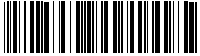
Let's learn encoding system.
- The first digit of a pair is encoded with 5 black bars and the second digit with 5 white bars.
- The bars can be fine or thick (the thick ones make 2,2 to 3 times the width of fines)
- There are always 2 thick bars among the 5 bars.
- 2 special characters are used as delimitor of beginning and end.
-
A checksum can be added; here is the calculation method :
The digits are numbered from right to left, then we compute X the sum of even digits and Y the sum of odd digits.
Let's calculate Z = X + 3 * Y
Let M the number divisible by 10 immediately superior to Z
The checksum is : M - Z
- In the following table the narrow bars are symbolized by "N" and the thick ones by "W".
Value
Encoding
0
NNWWN
1
WNNNW
2
NWNNW
3
WWNNN
4
NNWNW
5
WNWNN
6
NWWNN
7
NNNWW
8
WNNWN
9
NWNWN
Exemple of checksum for : 65732
(2 + 7 + 6) x 3 + 3 + 5 = 53 ---> M = 60
60 - 53 = 7
New code with the checksum : 657327 (Note that the number of digits including checksum is even.)
Bar code making.
Since we can create the bar code pattern it remains us to draw it on the screen and to print it on a paper sheet. Two approaches are possibles :
-
The graphic method where each bar is "drawn" as a full rectangle. This method enable to compute the width of each bar with a one pixel precision and so we can work with widths which
are perfect multiple of the used device pixel. This give us a good accuracy specially if the device have a low density as it's the case with screens and inkjet printers. This method
require special programming routines and does not allow to make bar codes with a current software.
-
The special font in which each character is replaced by a bar code. This method allow the use of any software like a text processing or a spreadsheet. (For example LibreOffice, the
free clone of MSoffice !) The scale settings according to the selected size can bring away small misshaping of the bar drawing. With a laser printer there's no probs.
Most fonts for barcodes 3 of 9 found on the net (incomplete demonstration fonts) are paid for (sometimes very expensive) and of dubious quality; the width of the modules is not always
constant in the definition of the font. So I decided to completely design a 2 of 5 interleaved font and offer it for download. I tested it on a laser printer with size 15, what gives a small barcode with
a width of about 1,2 mm/digit, result : reading at 100% ! On a good inkjet printer, we can use the same size 15 for the same result.
The font " code25I.ttf "
Since 2 of 5 interleaved barcodes encode pairs of digit my font contain the 100 pairs from 00 to 99. 2 additionnal characters are reserved for start and end symbol.
Pair of digits
ASCII code
Character
Pattern
00
0033
!
NNNNWWWWNN
01
0034
"
NWNNWNWNNW
.../...
93
0126
~
NWWWNNWNNN
94
0195
Ã
NNWNNWWNNW
.../...
99
0200
È
NNWNNNWWNW
Début
0201
É
NNNN
Fin
0202
Ê
WNN

Copy this file in the font directory, often named : \Windows\Fonts
Structure of a 2 of 5 interleaved barcode.
A 2 of 5 interleaved barcode will be build up in the following way :
- A start delimitor symbolized by the character E
- As many characters as necessary, each character represents 2 digits.
- An end delimitor symbolized by the character E
A small test program.
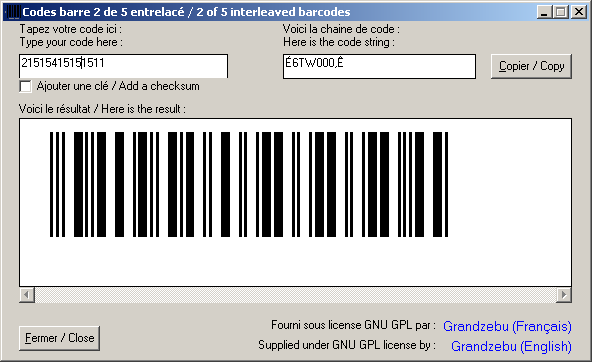
Here is a small program written with Visual Basic 6.
The setup file copy the program, Visual Basic
dependencies, source files and the font.
Setup file :
ZIP file without setup :
The Code25I$ function can be re-used in any other program written with Visual BASIC 6; it can also be copied just as it is in a VBA macro linked to an Excel or Word document.
Public Function Code25I$(chaine$, Optional key As Boolean)
  'V 2.0.0
  'Paramètres : * une chaine
  '             * un drapeau vrai si une clé doit être ajoutée
  'Parameters : * a string
  '             * a flag true if a key must be added
  'Retour : * une chaine qui, affichée avec la police CODE25I.TTF, donne le code barre
  '         * une chaine vide si paramètre fourni incorrect
  'Return : * a string which give the bar code when it is dispayed with CODE25I.TTF font
  '         * an empty string if the supplied parameter is no good
  Dim i%, checksum&, dummy%
  Code25I$ = ""
  If Len(chaine$) > 0 Then
    'Vérifier si caractères valides
    'Check for valid characters
    For i% = 1 To Len(chaine$)
      If Asc(Mid$(chaine$, i%, 1)) < 48 Or Asc(Mid$(chaine$, i%, 1)) > 57 Then Exit Function
    Next
    'Ajouter si nécessaire la clé
    'Add if necessary the checksum
    If key Then
      For i% = Len(chaine$) To 1 Step -2
        checksum& = checksum& + Val(Mid$(chaine$, i%, 1))
      Next
      checksum& = checksum& * 3
      For i% = Len(chaine$) - 1 To 1 Step -2
        checksum& = checksum& + Val(Mid$(chaine$, i%, 1))
      Next
      chaine$ = chaine$ & (10 - checksum& Mod 10) Mod 10
    End If
    'Vérifier si la longueur est paire
    'Check if the length is odd
    If Len(chaine$) \ 2 <> Len(chaine$) / 2 Then Exit Function
    'Calculer la chaine de code
    'Calculation of the code string
    For i% = 1 To Len(chaine$) Step 2
      dummy% = Val(Mid$(chaine$, i%, 2))
      dummy% = IIf(dummy% < 94, dummy% + 33, dummy% + 101)
      Code25I$ = Code25I$ & Chr$(dummy%)
    Next
    'Ajoute START et STOP / Add START and STOP
    Code25I$ = Chr$(201) & Code25I$ & Chr$(202)
  End If
End Function
Sample file for Excel
File for Libre Office
Since the first publication of this page, I'd received numbered versions in different languages :
Language
Author
Delphi
Francisco FERNANDEZ
 Visual Foxpro
Cédric THIVIND
C#
Pauline
Visual Foxpro
Cédric THIVIND
C#
Pauline